Quneryva
Slate Library
Slate Library
Couldn't load pickup availability
1. Problem Statement
Recruiting teams often create useful prompts and documents but store them without a clear naming or review system. Over time, materials may become outdated, duplicated, or disconnected from current hiring practices. A prompt written for one role may be reused for another without enough context or adjustment. Team members may also apply different review standards to similar recruiting tasks. Without an organised resource library, useful knowledge can become difficult to locate, compare, and maintain.
2. Solution
Slate Library introduces a structured method for creating and maintaining reusable recruiting resources. Learners organise materials by task, hiring stage, audience, and review purpose. The course explains how to document the context behind each prompt instead of saving only the wording itself. Guided activities help learners identify outdated materials, combine duplicated resources, and create clear revision notes. The final course activity brings these methods together in a personal or team-based recruiting library.
3. What’s Inside
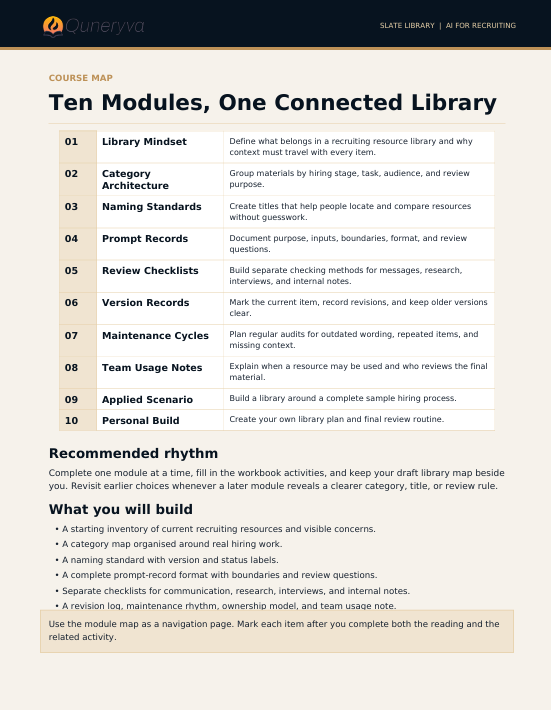
The opening module covers library planning. Learners identify the recruiting tasks they perform regularly and group them into practical categories, such as role intake, sourcing preparation, candidate communication, interview planning, evaluation notes, and process review.
The second module focuses on naming conventions. Learners create clear titles that describe the task, audience, role type, and version of each resource. This helps reduce confusion when several materials serve similar purposes.
A prompt-record module introduces a detailed documentation format. Each saved prompt includes its intended use, required context, input fields, output format, review questions, and revision date. Learners examine why a prompt should not be treated as a fixed instruction that works in every situation.
The checklist module covers factual review, tone review, role alignment, neutral language, and human approval. Learners build separate checklists for candidate-facing communication, internal documentation, interview preparation, and research summaries.
A maintenance module explains how to review stored materials at regular intervals. Learners identify duplicated items, remove outdated wording, update role examples, and record changes in a concise revision log. Activities also show how to mark resources that need further review before they are reused.
The team-library module examines shared working practices. Learners prepare short usage notes so colleagues understand when a resource may be relevant, which details must be updated, and who should review the final material.
The concluding activity asks learners to organise a complete recruiting resource set around a sample hiring process.
Included materials feature:
- Recruiting library planning map
- Resource naming worksheet
- Prompt documentation template
- Context input page
- Candidate communication checklist
- Interview material review sheet
- Role alignment checklist
- Neutral wording questions
- Revision log template
- Resource status labels
- Team usage notes framework
- Sample organised library structure
- Final library-building activity
4. Who Is This For?
Slate Library is intended for recruiters, talent teams, hiring coordinators, team leads, and people who create recurring recruiting materials. It may be useful for individuals who already have a collection of prompts, templates, notes, or checklists but want a clearer way to organise them.
No coding knowledge is required. The course centres on written resources, documentation habits, practical exercises, and recruiting scenarios.
5. What You’ll Learn
- Map recurring recruiting tasks into clear categories
- Create consistent names for prompts and materials
- Record the intended purpose of each resource
- Define the context required before reuse
- Add input fields and output instructions
- Build separate review checklists for different tasks
- Identify duplicated or outdated materials
- Record revisions in a clear change log
- Mark resources that require further review
- Organise prompts by hiring stage and audience
- Prepare concise usage notes for team members
- Review candidate-facing drafts before use
- Connect stored materials with current role information
- Maintain human approval within every workflow
- Build an organised recruiting resource library
6. Refund Terms
Slate Library includes a 30-day refund window beginning on the recorded purchase date. Requests must be submitted within that period and are reviewed according to the terms displayed on the course page when the order is placed.
Eligibility may depend on the stated course-use and completion conditions. Approved refunds are returned through the original payment method, with processing timing determined by the payment provider.
Self-paced learning overview
- 📥 Digital file available after purchase
- ♾️ Long-term availability
- 🔐 Secure checkout
- 🗓️ Content updated in 2026
How are the Quneryva course tiers arranged?
How are the Quneryva course tiers arranged?
The tiers follow a gradual learning path, beginning with introductory materials and moving toward broader recruiting workflows. Each tier has its own topic range, learning depth, exercises, and downloadable resources. Learners may select a tier that matches their current role, prior knowledge, and study goals.
Do I need prior AI knowledge before enrolling?
Do I need prior AI knowledge before enrolling?
No prior technical background is required for the introductory tiers. The materials explain key ideas through clear language, recruiting examples, guided activities, and structured modules. Familiarity with basic recruiting tasks may help learners connect the topics with their daily work.
Can I choose another tier later?
Can I choose another tier later?
Yes. Learners may begin with one tier and select another Quneryva course when they are ready to explore additional topics. Each course listing explains its scope, included materials, and recommended learning stage.
Share